Carbure, the self-hosted household budget
Take back control of your budget.
Carbure is a web portal for tracking the household budget and bank transactions, free, open source and self-hosted: on a server, a Synology NAS or any machine with Docker, your data stays at home. Transactions are fetched automatically from French banks thanks to woob, cleaned up and categorized by keywords, then viewed:
- in the web portal (
portal/, Vue 3): transactions, checking, search, recurring transactions, statement import, budgets, insights, trends, and for administrators rules, categories, accounts and users; - in the Carbure iPhone and Android apps: transactions, checking, budgets, overviews, trends and synchronization, sign-in with Face ID or fingerprint, and push notifications (through the Carbure Push service) after each synchronization, for large expenses and reached budgets — available on the App Store and on Google Play; the portal can also be installed as an app on a computer or phone;
- through an AI agent (Claude, ChatGPT, Cursor, Copilot, Gemini…) thanks to the built-in MCP server, read-only.
All of them rely on the same PHP REST API (src/).

Carbure in one minute: synchronization, categorization, budgets, monthly flow, trends, insights, notifications, AI agent and household.

The iPhone and Android apps: your budget in your pocket. Transactions, budgets, overviews and notifications of the month.
Features
| Area | What Carbure does |
|---|---|
| Installation | In-browser wizard (database, schema, administrator), nginx + PHP-FPM Docker image with woob, automatic or one-click database updates |
| Synchronization | Upcoming transactions and history via woob, for all accounts or a single one, real-time progress (SSE), date and result of each account's last synchronization, schedulable daily synchronization, strong authentication validated from the portal |
| Statement import | Bank files (OFX/QFX, QIF, CSV, CAMT.053), preview of new transactions, already known ones and probable duplicates before importing, categorization by the rules |
| Accounts | Connected banks (several logins for the same bank, readable name, deletion) and their followed accounts, picked among those woob finds and nameable; update of woob's bank modules from the portal |
| Transactions | Monthly list, picker of the months with transactions, label search with total, similar transactions, checking (verified / unverified), manual categorization with a rule suggestion, source bank and account, permanent deletion |
| Recurring transactions | Automatic detection of monthly transactions (salary, rent, subscriptions, bills), “Monthly” badge, list of those expected this month |
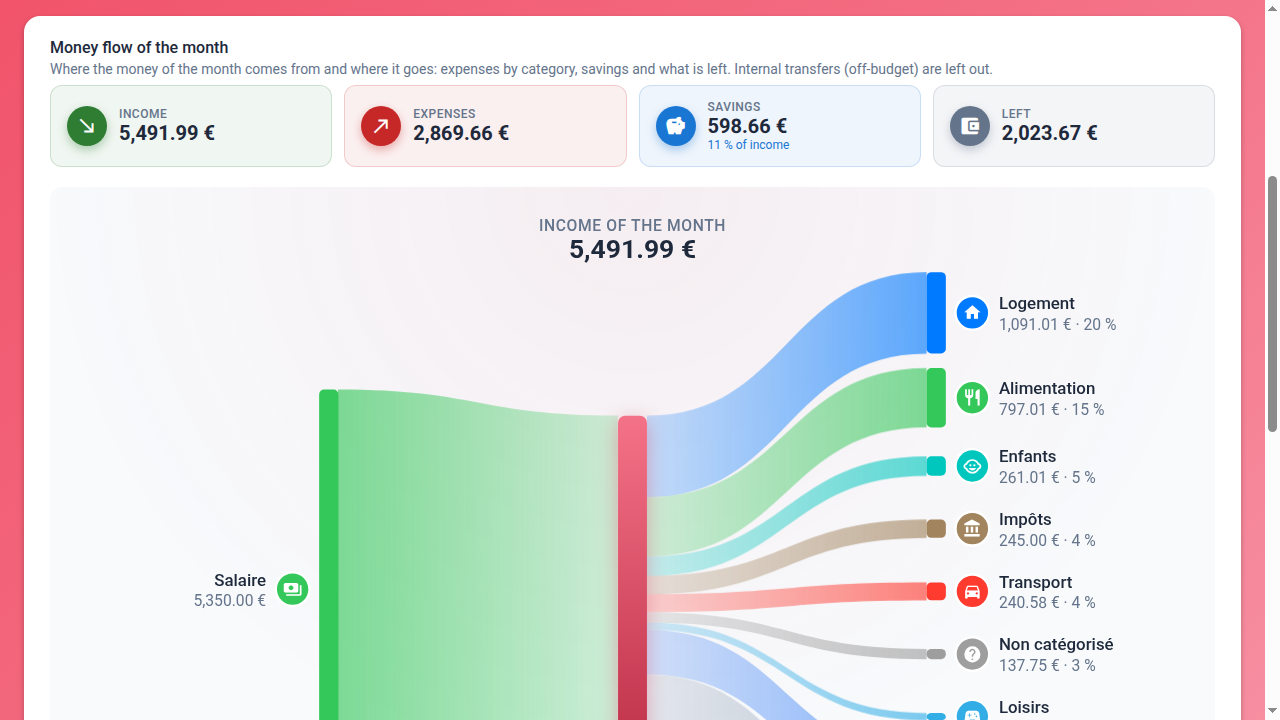
| Budgets | Monthly flow (Sankey diagram income → expenses, savings, what is left), monthly summary, budget per category with remaining amount or overrun, parent category equal to the sum of its subcategories or to its own amount, transactions of a category, copy of the previous month's budgets |
| Trends | Debit, credit, off-budget, planned budget and savings (“Epargne” category) over 3, 6 or 12 months, comparison with another period |
| Categorization | Hierarchical categories (icon, color), keyword rules applied at each synchronization or on demand, notification on a rule |
| Insights | Monthly indicators defined by a guarded SQL query, yearly history |
| Mobile apps | Native iPhone and Android apps: transactions of the month, checking and categorization, budgets (editable), overviews, trends over 24 months, synchronization, Face ID / fingerprint, two-factor authentication, theme synced with the profile |
| Notifications | Push on the iPhone and Android apps (Carbure Push service: APNs, FCM) and email (SMTP), chosen by each user and for each type: result of a synchronization, new expense above its threshold, transaction of a watched rule, monthly budget reached |
| AI agents | Read-only MCP server, enabled by an administrator; Claude (web, Desktop, mobile) connected through OAuth without a token, other agents with an access token with a validity period |
| Users | User and administrator profiles, language (fr, en, es, it, de, pt), theme, alert thresholds, notification channels, devices, last sign-in, lockout after 5 failed sign-ins |
| Display | Light or dark theme (follows the system, or picked in one click), increased contrast and system forced colors, WCAG AA accessibility, portal installable as an app |
| Administration | Users, server settings (including email sending, with a test email), filterable logs, scheduled synchronization command, one-click database update |
Where to start?
- Discover everything Carbure does: Features
- Install Carbure: Installation or the Synology NAS tutorial
- Use the portal: Web portal
- Connect an AI agent: AI agents (MCP)
- Compare with Firefly III, Actual Budget, Kresus, Sure and ezBookkeeping: Comparison
- Understand how it works: Architecture
- Integrate a client: API reference
- Contribute: Development
- Ask a question, share an idea or a tip: Discord server
“Household” model
All users of an installation share the same bank accounts, transactions, budgets and categories. User accounts are used for authentication, notifications, preferences (language, theme, alert thresholds, notification channels, devices, access tokens) and the profile (user or administrator).